

I can now control After Effects through natural language communication with AI—the MCP revolution.
A few months ago, I discovered the existence of MCP protocols (Model Context Protocol) that allow you to control applications through a language model (LLM) like ChatGPT or Claude. I then started researching how to implement this for my main work tool: After Effects, although I was missing the key piece of how to get Adobe to listen to the instructions the AI was sending. Then I discovered Mike Chambers’ (@mikechambers) Photoshop and Premiere MCP, which connected Claude with Adobe applications via WebSocket servers, giving me the key to start programming the After Effects MCP that I can now use in my daily workflow. While Chambers opted for implementation with UXP plugins, I chose a CEP extension since UXP wasn’t yet available for After Effects. After several months working on the code, implementing functionalities and tools that the AI could use within the application, the first experiments conducted yield results worth sharing.
How the system works
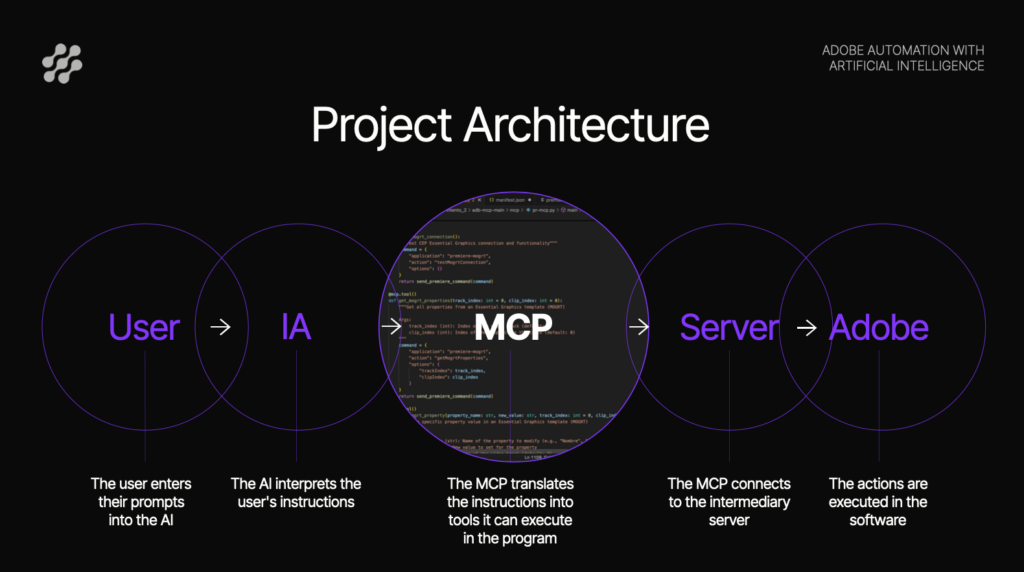
The architecture is as follows:
- Claude receives instructions in natural language from the user
- The MCP protocol enables this bidirectional communication between the AI and the application through a WebSocket server that acts as a communication bridge
- A CEP extension translates the instructions into ExtendScript API calls
- After Effects executes the corresponding actions
The first experiments
The video shows a comparison of an intro animation for a house video podcast generated by three different methods:
- Manually made by a professional
- Generative AI -> Google’s Nano Banana (generates non-editable final video)
- Agentic AI -> Our MCP (generates editable After Effects project)
With a prompt very similar to the one provided to both Nano Banana and the MCP, the difference between them is abysmal. While Nano Banana falls far short of the result we wanted to achieve, the MCP comes very close to the human version, needing only minor timing and speed adjustments. Additionally, the MCP system produces a complete After Effects project that is fully editable. All layers, properties, and keyframes are accessible for subsequent adjustments, whereas with Nano Banana we have no possibility to modify anything beyond launching a new prompt and hoping the new version gets a bit closer to the expected result.
Use case: Data graphics for El País
In the second video, I asked Claude to use a bar chart template I created previously and a screenshot of maximum temperature data in Madrid to create the animation. So starting from:
- A screenshot with monthly temperature data
- A pre-existing bar chart template
The system executes:
- Configuration of 12 bars with heights proportional to the data
- Positioning of text labels
- Y-axis scale adjustment (0° to 35°)
- Activation/deactivation of elements as needed
The results of the experiments have been surprising, and the scalability is enormous. At the moment, it only has a handful of tools implemented and it’s already capable of producing real work. Plus, there’s the possibility of developing more protocols that connect the rest of the Adobe suite. In fact, I also implemented a small MCP with a CEP extension for Premiere that allowed modifying MOGRT templates, which worked successfully although it doesn’t yet have enough robustness to use it in the normal workflow.